STYLE.md · Exact · candid · engineered
How Signal works. Every rule, written down.
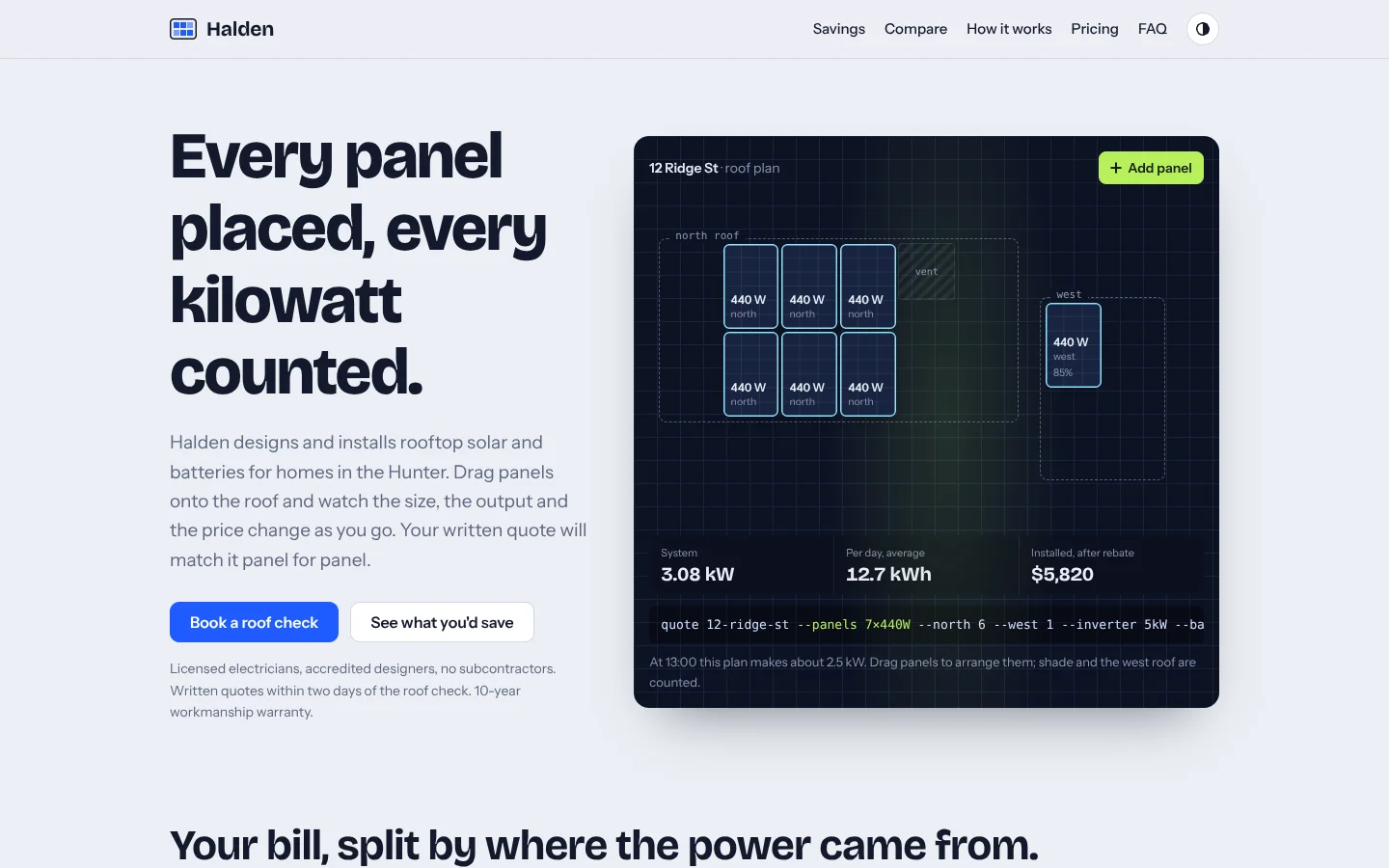
Signal is the identity for businesses whose best argument is a number. A cool paper page, set like a good specification sheet, surrounds one dark, gridded light table: an interactive instrument where the visitor plans, measures or prices something real and watches the result update. Headlines are full sentences in a heavy grotesque that end with a full stop. Features are definition rows, not cards. Claims come with figures, figures come with their method, and tables say honestly where you're behind.
Derived from the Mojo RDP site. Templates contain no Mojo branding.
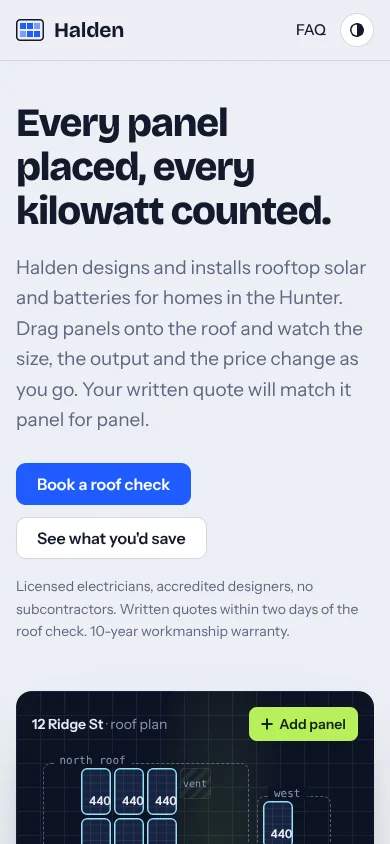
| Template | template/index.html (Halden Solar, a fictional solar installer, with a drag-and-drop roof planner) |
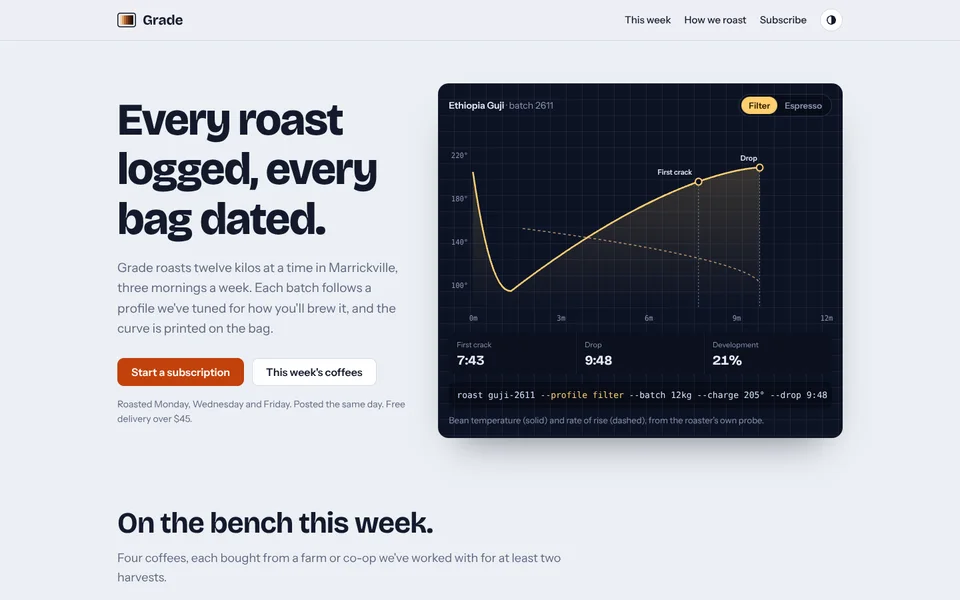
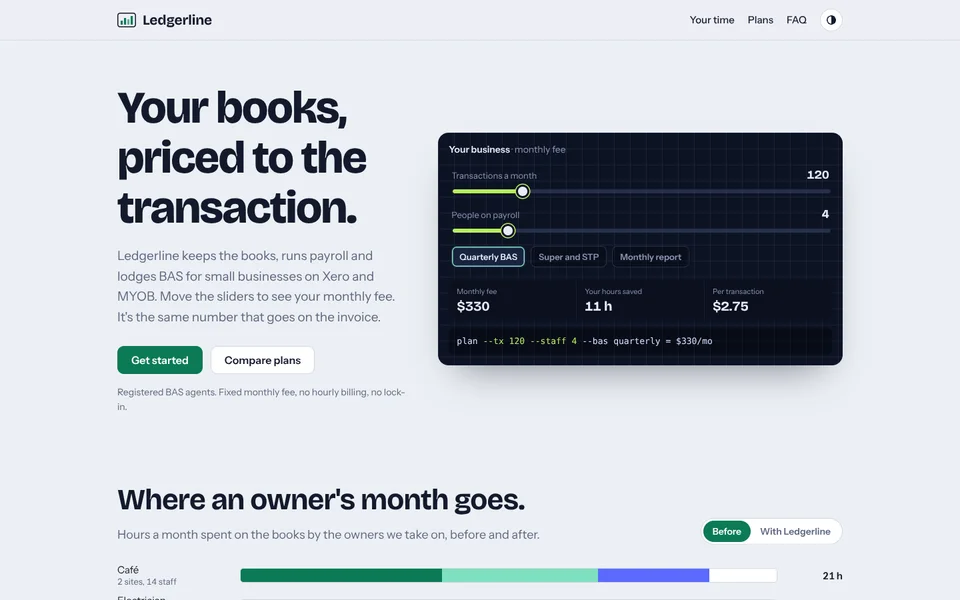
| Examples | examples/grade-coffee (coffee roaster, roast-curve instrument), examples/ledgerline (bookkeeping firm, fee calculator) |
| Tokens | tokens.css (canonical), tokens.json (generated) |
| Modes | Light by default, full dark mode. Follows the system; the round theme button overrides and is remembered. |
Best for
- Business types: trades and energy (solar, electrical, HVAC), engineering and hardware, developer tools and infrastructure, specialist retail with specs (coffee, audio, bikes), accountants, bookkeepers, brokers, labs, anything sold on performance, price transparency or measured results.
- Audiences: careful buyers who compare quotes, read the fine print and trust a table more than an adjective. Technical decision-makers. People who were burned by a vague quote last time.
- Less suited to: fashion, beauty, nightlife, luxury, or any brand that sells on mood rather than measurement. See Aurora.
Personality and voice
Signal sounds like the best engineer you know explaining something to a smart friend: plain, specific, a little dry, never selling. It shows its working.
- Headlines are complete sentences with a full stop: "Every panel placed, every kilowatt counted.", "Your bill, split by where the power came from.", "What you get that a cheap quote leaves out.", "Straight answers."
- Numbers carry the claims: "2 days from the roof check to a written, fixed quote". Every figure has a unit, and each chart or table has a note saying how it was measured.
- Honesty is a feature. Comparison tables mark where you're partly there (ring) or absent (grey). Notes say what's a sample and what's measured.
- Buttons: Book a roof check, See what you'd save, Start a subscription, Get a fixed quote. The one "add" action on the instrument is lime: Add panel.
- Microcopy: "Drag panels to arrange them; shade and the west roof are counted.", "Prices include GST.", "We reply within one business day."
- Avoid: superlatives without numbers, "seamless", "best-in-class", exclamation marks, marketing fluff in tables.
Colour
| Token | Light | Dark | Role |
|---|---|---|---|
--paper |
#eceff4 |
#0f1422 |
Page. Cool grey-blue, never cream. |
--surface |
#ffffff |
#161d2f |
Plans, tables, ghost buttons. |
--ink |
#131a2c |
#e8ecf6 |
Text and the 2px proof rules. |
--muted |
#5d6680 |
#98a2bd |
Secondary text, notes. |
--line |
#d3d8e3 |
#26304a |
Hairlines, borders, row rules. |
--accent |
#1f5bff (cobalt) |
#5b84ff |
Links, primary buttons, group labels, first data series. |
--accent-soft |
#e3eaff |
#1b2648 |
Recommended plan, highlighted table column, inline code. |
--glow |
#8fe3ff |
same | Tile outlines on the table, second data series. |
--lime |
#b7f05a |
same | The single "add / new" action on the instrument. |
--violet |
#7a5cff |
same | Third data series. |
--table / --table-grid |
#0d1324 / #1a2238 |
#080c18 / #141b2e |
The light table: always dark, with a 24px grid. |
--table-glass |
#18233f |
#1a2645 |
Tiles on the table. |
--ok / --built / --no |
#17865a / #b07400 / #8a93aa |
#3ccf8e / #f0b43c / #6d7792 |
Status marks: filled, ring, grey. |
Contrast (WCAG): ink on paper 15:1; muted on paper 5.0:1; cobalt on white 5.3:1 and on paper 4.56:1; table-muted on the table 6.3:1; lime-ink on lime 12.5:1. In dark mode muted is 7.2:1 and accent 5.4:1. The amber ring (--built) is a mark, not text; its label stays in ink.
Typography
- Bricolage Grotesque (Google Fonts) 500 / 700 / 800 for headlines, figures, prices and brand.
- Instrument Sans (Google Fonts) 400 / 500 / 600 for reading and UI.
- System mono (
ui-monospace, Cascadia Code, SF Mono, Menlo, Consolas) for the instrument's command line and axes.
| Use | Size | Weight | Tracking | Line height |
|---|---|---|---|---|
| H1 | clamp(40px, 5.6vw, 68px) |
800 | −0.03em | 1.1 |
| H2 | clamp(30px, 3.6vw, 44px) |
700 | −0.02em | 1.1 |
| Proof figure | clamp(30px, 3.4vw, 42px) |
800 | −0.02em | 1 |
| Definition row title | 21px | 700 | −0.01em | 1.1 |
| Lede / intro | 19px / 18px | 400 | 0 | 1.6 |
| Body | 17px (16px on phones) | 400 | 0 | 1.6 |
| Group label | 13px uppercase | 600 | 0.08em | 1 |
The signature move: heavy, tightly tracked Bricolage sentences that end with a full stop, beside lighter Instrument Sans prose, and font-variant-numeric: tabular-nums on every number so figures line up and readouts don't jitter as they change.
Layout
- Wrap 1120px, 16px gutters (safe-area aware). Everything is left-aligned.
- Hero: a 5 / 7 split. Text left; the light table right. Stacks below 900px.
- Bands: sections start 72px apart with an H2 and a muted intro (max 40em).
- Definition rows: two columns, 56px gap, each row with a 1px top rule; group labels span both columns in uppercase cobalt.
- Proof grid: four columns of figures on 2px ink rules (two columns on phones).
- Tables live in a bordered, rounded, horizontally scrolling container so they never break the page.
- Plans: four (or three,
.plans-3) columns; the recommended plan is tinted--accent-softwith no border. - Spacing scale: 4, 8, 12, 16, 24, 32, 48, 72, 96.
Shape
- Radii: 4px inline code and keys; 6px tiles on the table; 10px buttons, tables and code; 14px plans; 16px the light table. Pills only for segmented toggles, the theme button and "New" tags.
- Borders: 1px
--lineeverywhere; 2px ink rule above proof figures. - Shadow: exactly one, under the light table:
0 30px 60px -30px rgba(13,19,36,.55). In dark mode the table also gets a 1px line so it doesn't merge with the page. - No glass except the sticky header (88% paper + 10px blur).
Motion language
Signal moves when you touch it, plus one quiet sign of life.
| What moves | How | Timing |
|---|---|---|
| Tiles placed on the table | Plug in: scale 0.6 → 1 with a slight overshoot. | 0.45s cubic-bezier(.2,.9,.3,1.2) |
| Tiles dropped or nudged | Glide to the nearest free grid spot. | 0.25s ease on left / top |
| Measured bars | Segments re-measure when the toggle changes, and grow from zero on load. | 0.4s ease on width |
| Instrument curves | Interpolate between profiles. | 0.6s ease-out |
| The table's light (signature) | A soft lime glow sweeps across the table through a simulated day; the note reads the current output. | 24s loop, 1s steps |
| Theme button | The half-moon icon rotates 180°. | 0.4s plug curve |
There are no scroll reveals and no decorative loops: content is simply there. Degrading: the default follows prefers-reduced-motion; the footer Motion switch overrides it and is remembered. With motion off, every change still happens, instantly, and the sweep holds at noon.
Imagery and illustration
- The instrument is the hero image. Build it from real data: the customer's own roof, menu, price list or measurements.
- Photography, if any, is documentary and specific (the actual crew, the actual roaster), in rectangles with a 10px radius. No stock "happy customer" shots.
- Charts follow the bar and legend patterns: cobalt, cyan, violet, then line grey, with a legend and a note on method.
- Icons: 1.5–2px line icons in ink. The logo motif is a framed set of stripes (colour bars, cells, roast stages, ledger columns) inside a rounded rectangle.
Signature components
- Light table. Dark gridded panel: a title bar with an object name and a lime add button; a stage of draggable, keyboard-movable tiles that snap to a grid inside dashed zones and around hatched blocks; three readouts; a monospace "command" line restating the state; a one-line note. Driven by
Signal.LightTable(). - Instrument variants. The same panel as a curve plotter (Grade) or a slider calculator (Ledgerline).
- Measured bars. Rows with a label and sub-label, a stacked track and a tabular total, a segmented toggle to switch cases, a colour legend and a method note.
Signal.bars(). - Proof figures. Big Bricolage numbers on 2px ink rules with a one-line explanation.
- Definition rows with uppercase group labels and soft "New" pills.
- Honest comparison table: your column tinted, others marked with status dots and rings, group rows in small caps, a sources note underneath.
- Status marks: filled dot (yes), amber ring (partly / pending), grey dot (no), always with a key.
- Plans with an add-on footer line; the recommended one tinted.
- Closing instrument: a second, smaller light table holding a short form.
- Code block with a copy button, when the product has something to paste.
Do and don't
Do
- Make the instrument genuinely useful and accurate. It is the pitch.
- Put a number in every claim, and a method note under every chart.
- Keep exactly one dark instrument above the fold, and at most one more on the page.
- Mark partial support honestly with the ring.
Don’t
- Turn features into a grid of icon cards. Use definition rows.
- Use the lime anywhere except the instrument's add / new action and its highlights.
- Centre-align body sections, or add scroll animations.
- Warm the paper to cream, or add a second accent.
- Invent statistics. Template figures are placeholders and must be replaced with measured ones.
Accessibility
- Contrast as listed above; all text pairs meet WCAG AA in both themes.
- Every instrument works without a mouse: tiles are focusable buttons; arrow keys move them a cell at a time, Delete removes them; add is a real button; readouts use
aria-live="polite". - Bars have
role="img"with a full text label; toggles usearia-pressed. - Visible focus: 3px cobalt outline (2px lime on table tiles). Skip link first.
- Tables scroll inside their container at narrow widths; nothing scrolls the page sideways at 360px.
- Theme button and Motion switch are labelled; the theme follows the system until chosen.
How to make it yours
| Dial | What you can change | Rules |
|---|---|---|
| Accent | --accent, --accent-soft (and their dark-mode values) |
One accent only, AA on white and on paper. Cobalt, roast orange (Grade) and ledger green (Ledgerline) all work. |
| Instrument colours | --lime, --glow, --violet |
Lime stays the brightest thing on the table; it can become crema, mint or sodium, but must keep 4.5:1 with --lime-ink. |
| The instrument | What's on the table: tiles, curves, sliders, a form | It must use the customer's real domain and real numbers, and work by keyboard. |
| Logo | Framed-stripes motif, or the customer's own mark | Sits at 28px in the header beside the name in Bricolage 700. |
| Copy and figures | All of it | Sentence headlines with full stops; numbers with units and sources. |
| Sections | Add, remove, reorder | Keep hero + instrument first. |
| Not negotiable | Cool paper, the dark gridded light table, Bricolage + Instrument Sans, tabular numerals, definition rows over cards, honest status marks, the Motion switch | These are what make it Signal. |