STYLE.md ·
How Clause works. Every rule, written down.
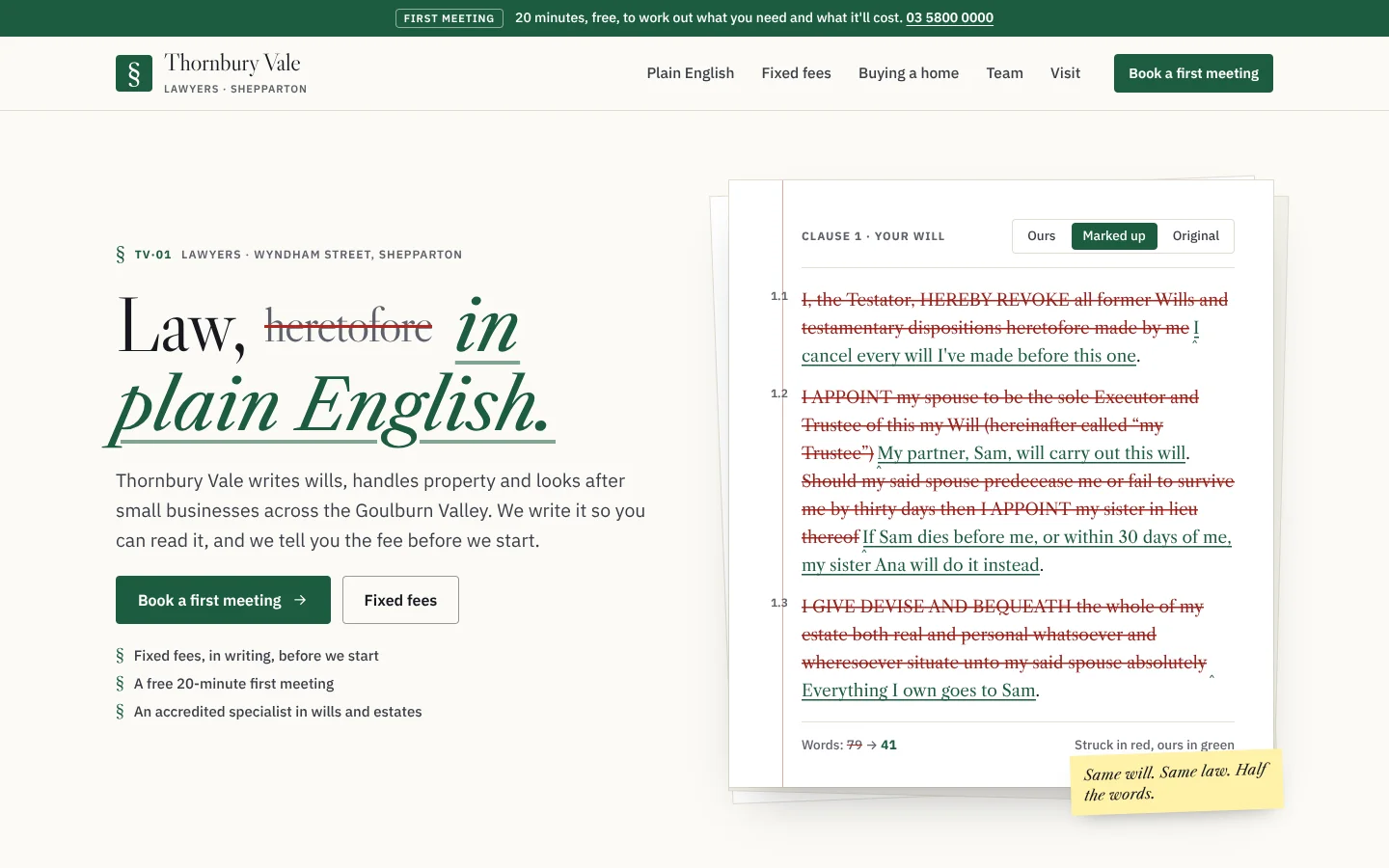
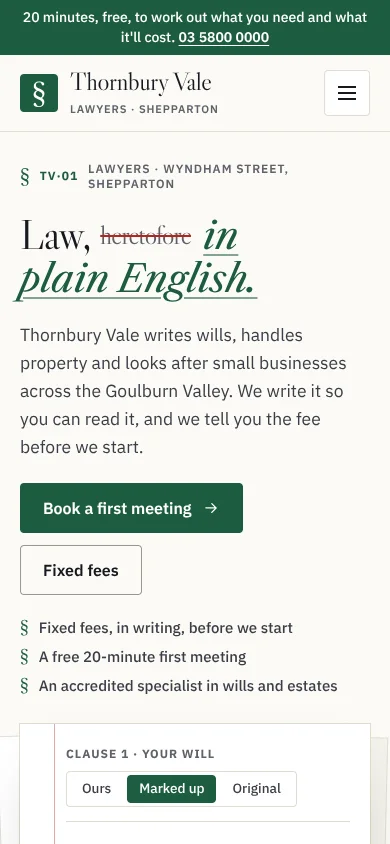
A law firm, in plain English. In the hero, a clause redlines itself: the legalese is struck out in red and plain English goes in, in green. You can switch between Ours, Marked up and Original, and see how many words it saved. A matter timeline shows what you do, what we do, and where you're up to. Legal terms explain themselves when you tap them. A fixed-fee quote keeps other people's fees apart from ours. Libre Caslon and IBM Plex Sans on foolscap white, with one bench green.
Plain · exact · upfront
Best for
- Law firms: wills and estates, property and conveyancing, family law and small business. That means plain-English documents, fixed fees, written costs disclosure, accredited specialists, conflict checks and the professional standards statement, all written to the solicitors' conduct rules (see "Law firms: what we build in").
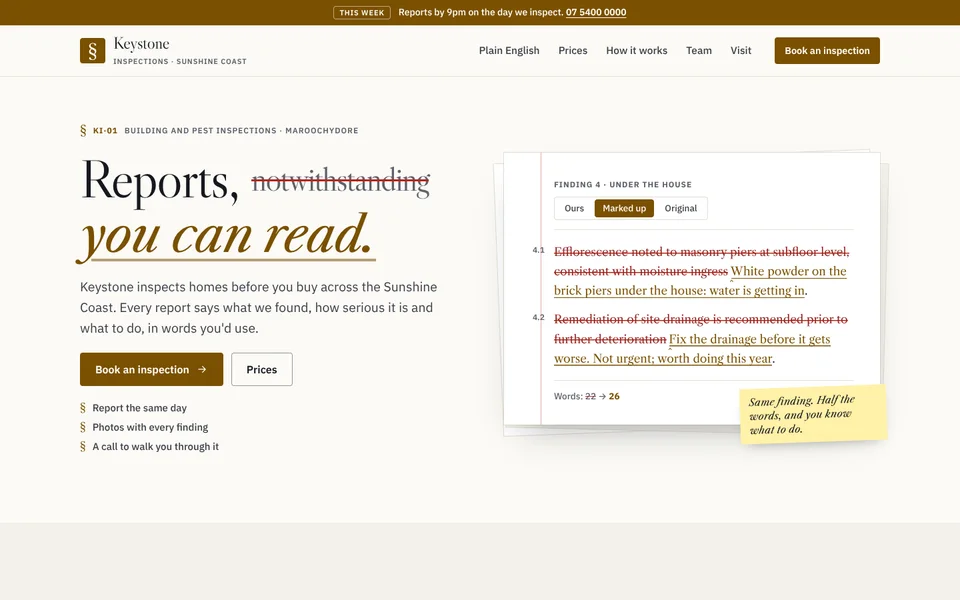
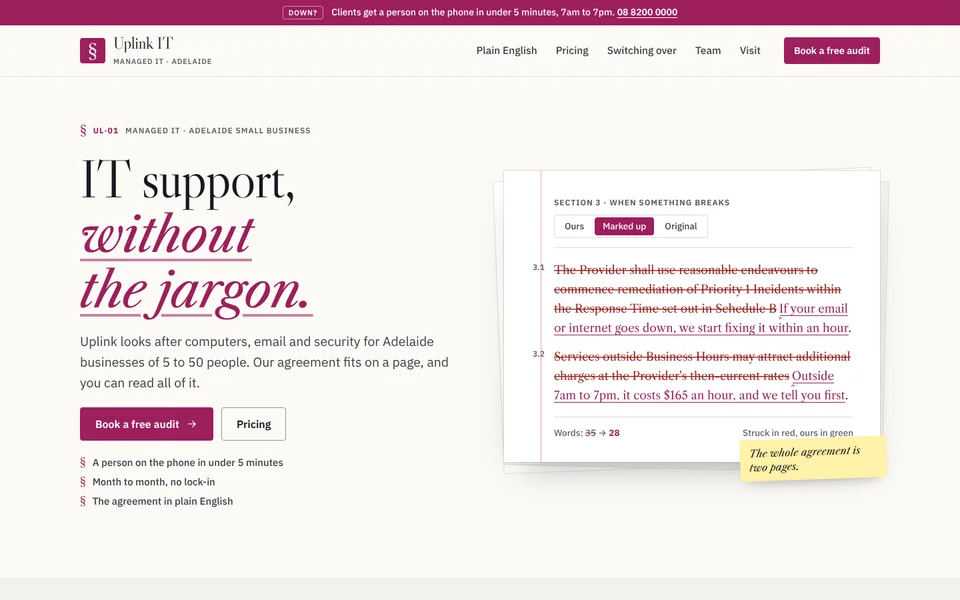
- Anyone whose product is a document people struggle to read: building inspectors (Keystone, a report in plain English), managed IT (Uplink, the service agreement in plain English), accountants, insurance brokers, strata managers and planners.
- Audiences: people who are wary of jargon and of open-ended bills, and who want to know what happens next.
Less suited to: anything playful or loud (Collar, Marquee, Riso); visual portfolios (Contact, Folio).
Personality and voice
Plain, exact and upfront, like a good lawyer explaining it over the table. Here's what it says, here's what it means, here's what it costs and here's what happens next. Never "heretofore".
- Headlines strike the legalese and insert the plain word: "Law, [heretofore, struck] in plain English." · "The fee, [to be advised, struck] up front." · "Buying a home, step by step."
- Buttons: "Book a first meeting" · "Fixed fees" · "Request a first meeting"
- Microcopy: "Tap a dotted word for what it means." · "If the job changes, we tell you before it costs more." · "Same will. Same law. Half the words."
- Words to avoid on a law firm site: "specialist" or "specialises in" for anyone who isn't accredited, "expert" unless you can prove it, "best", "guaranteed result", "no win no fee" without its conditions, and testimonials about outcomes.
Colour
| Token | Paper (light) | Chambers (dark) | Role |
|---|---|---|---|
--paper |
#fbfaf6 |
#0f1413 |
Foolscap white; the chambers at night |
--card |
#ffffff |
#18201e |
The sheet, the quote |
--well |
#f3f1ea |
#131a18 |
Alternate sections |
--line |
#e2ddd0 |
#2a3532 |
Rules and hairlines |
--ink / --ink-2 |
#16181f / #3a3d47 |
#eef2ef / #cdd6d1 |
Text and the closing card |
--muted |
#5e616b |
#9aa7a1 |
Labels and struck headline words |
--green |
#1d5c3f |
#8fd3b0 |
The one accent: inserted plain English, buttons, links and the top line |
--red |
#b3261e |
#ff8a80 |
Track changes: struck legalese, the margin rule, safety notices |
--margin |
#fff1a8 |
#4a4316 |
The highlighter for margin notes and "You are here" (a background) |
Measured contrast (WCAG), Paper:
- Ink on paper: 17.0:1
- Muted on paper: 5.9:1 (5.5:1 on well)
- Green on paper: 7.6:1 (7.0:1 on well, 6.7:1 on its soft fill)
- White on green: 7.9:1
- Red on paper: 6.3:1 (6.5:1 on card)
- Ink on the highlighter: 15.5:1
Measured contrast, Chambers:
- Ink: 16.5:1
- Muted: 7.5:1 (6.7:1 on card)
- Green: 10.7:1
- Text on green: 9.3:1
- Green on its soft fill: 7.9:1
- Red on card: 7.3:1
- Ink on the highlighter: 8.8:1
Example accents on paper (light / dark):
- Ochre (Keystone): 6.8:1 / 11.0:1
- Magenta (Uplink): 7.3:1 / 8.6:1
- Harbour navy (Harbour & Hale): 10.8:1 / 10.1:1
Typography
- Display: Libre Caslon Display, 400. Headlines in the voice of a well-set document.
- Documents: Libre Caslon Text, 400 and 700, plus italic. Used for clauses, the inserted words in headlines, names and terms.
- Reading: IBM Plex Sans, 400–700. Used for body copy, fees, labels and forms.
| Token | Size | Use |
|---|---|---|
--fs-h1 |
clamp(42px, 5.6vw, 88px) | Page headline |
--fs-h2 |
clamp(32px, 3.8vw, 56px) | Section headline |
--fs-h3 |
22px | Card titles |
--fs-lead |
clamp(17.5px, 1.35vw, 20px) | Intro paragraphs |
--fs-body |
17px | Body |
--fs-label |
12px caps | Eyebrows after a § (TV·01) |
The signature move: a headline strikes out a legalese word in red at a smaller size, then inserts the plain phrase in green Caslon italic with an underline, exactly as track changes would show it.
Layout
- Frame: a 1200px wrap with a gutter of
max(20px, 4vw). There's a green top line with a small stamp ("First meeting") and the phone number, and a sticky header whose links underline when hovered. - Hero: the copy sits on the left. On the right is the redline: a sheet with two more sheets behind it, a red margin rule, clause numbers in the margin and a highlighter note stuck on its corner.
- Then, in order:
- Plain English: the terms you tap, plus a short list of words
- The quote, beside its pitch and a margin note
- The matter timeline
- The team, under ink rules
- Visit facts and an FAQ
- An ink closing card with a drifting §
Shape
- Square and exact:
--r-sis 4px,--r-m8px and--r-l14px. Buttons and controls are near-square; dividers are rules, not cards. - The § is the mark. It appears on eyebrows, lists, the brand tile and the closing card.
- The sheet: a white page, two sheets fanned behind it, and a margin rule.
Motion language
- The redline: when it scrolls into view, each piece of legalese gets a red strike drawn across it (about 0.5s), then its plain-English replacement writes in from left to right (about 0.6s), change by change. The word count shows before and after.
- The timeline: "You are here" is a highlighter tag, and the current step's number pulses softly.
- The quote: the total bumps when it changes.
- Terms: the explanation drops in.
- Elsewhere: the closing card's § drifts. Reveals rise 14px and fade over 650ms. The phone menu drops in.
- Motion switch in the footer (
[data-motion-toggle],html.calm, remembered assite-motion, default fromprefers-reduced-motion). With motion off, the redline starts marked up with nothing animating, and the pulses and drift stop. - Chambers switch (
[data-theme-toggle]), remembered assite-theme.theme-colorfollows.
Imagery and illustration
The document is the picture. Real photos of the office and the team are welcome. Avoid gavels, scales of justice, handshakes and stock courtrooms.
Signature components
- The redline:
figure.redline[data-redline][data-view][data-draft]›.sheet›.rule+.redline-head(button[data-view="ours"|"marked"|"original"]) +.doc > p[data-no]with<del>and<ins>+figcaption.redline-foot([data-count-from],[data-count-to]), with an optional.note. - The matter timeline:
.steps[data-steps][data-start][data-here][data-lead][data-left][data-end]›select[data-steps-now]+ol.steps-list > li[data-weeks](button.n,h3 > small,.lanes) +[data-steps-out]. - Terms:
span.term-wrap›button.term[aria-controls]+span.def[id][role=note](b,.x). The.wordslist (dl) goes with it. - The quote:
.quote[data-quote][data-unit][data-gst][data-disb-label][data-total-label]› radios and checkboxesinput[data-fee][data-disb][data-disb-note][data-label][data-per], an optionalinput[data-q-qty], and.fee-note[data-q-lines]. - Also:
.person(.role.accfor an accredited specialist, plus.reg),.card,.facts(.stack),.notice(.warn),.margin-note,.topline,.faq,.licence, and.close-card(--close-em).
Multi-page kit
- Phone menu:
.menu-btn[aria-controls]opens.site-menu, whose links carrydata-noand show as "§ 01". Escape, an outside click or choosing a link closes it, and Tab stays inside while it's open. - Current page:
aria-current="page"gets the green underline. - Inner pages:
.page-head,.crumbs, a.tagand a smaller.h1. - Fields:
.field,.fields,.field-wide,fieldset.field-set,.check,.form-card,[aria-invalid="true"]andform[data-template]. - Tiles:
.choices›label.choice > input + span > b + small. - Segmented control:
.seg. Filters work on[data-tags]. - Gate:
[data-gate]withbutton[data-show="panel-id"]. - Slider, switch, tables and layout:
input.range,.switch[role=switch],.table/.table.stack,.rand.grid-2.lean. - Events:
redline(detail.view),steps(detail.step, name, weeksLeft),term(detail.term) andquote(detail.fee, disbursements, total, qty, items). - Helper:
Clause.refresh(root).
Law firms: what we build in
Solicitors' advertising falls under the Australian Solicitors' Conduct Rules, the Legal Profession Uniform Law (NSW, Victoria and WA) and the Australian Consumer Law. We checked these in October 2026:
- Not false, misleading, deceptive or offensive (ASCR 36.1). There are no "best", no "guaranteed" and no outcome testimonials anywhere in the templates.
- "Accredited Specialist" only for accredited specialists (ASCR 36.2). Only a lawyer accredited by the relevant law society (the Law Society of NSW, or in Victoria the LIV) uses the title. Claiming to "specialise" is generally read as claiming expertise, so everyone else says what they practise in. The team card shows each person's accreditation or practising certificate.
- Costs in writing (Uniform Law s 174). Before taking on the work, the firm discloses in writing how it charges and an estimate of the total, unless the costs are likely to be $750 or less. The quote keeps our fee apart from disbursements and says this plainly. Disputes get estimates by stage rather than fixed fees.
- The professional standards statement. Firms in a professional standards scheme must show "Liability limited by a scheme approved under professional standards legislation" on their website. It's in every footer.
- Confidentiality and conflicts. The contact form asks only for the other person's name, so the firm can run a conflict check, and asks people not to send confidential details or documents until the firm confirms it can act.
- General information, not legal advice. The footer says so.
- Family law safety. There's a "Leave this site" button that replaces the page in the browser's history, 000 and 1800RESPECT on the relevant pages, and the form asks which ways of contact are safe.
These notes are design guidance, not legal advice.
Do and don't
- Do show the plain version first and keep the original one tap away.
- Do separate your fee from other people's fees, and promise the disclosure in writing.
- Do say who's accredited, and what everyone else practises in.
- Don't call anyone a specialist unless they're accredited.
- Don't use red for anything except struck words and safety.
- Don't set text on the highlighter colour except ink.
Accessibility
- Contrast and focus: AA contrast throughout (measured above), a skip link and a 3px focus ring.
- The redline: uses real
<del>and<ins>elements, with a labelled view switch (pressed states) and a word count. With motion off, it doesn't animate. - Terms: real buttons with
aria-expandedandaria-controls. Escape closes the explanation and returns focus to the term, and the explanation stays on screen. - The timeline: a labelled select plus a button for each step, with where you're up to announced politely.
- The quote: radios and checkboxes, with the fee note announced politely.
- Forms: every field is labelled, errors are marked with
aria-invalid, and an alert says what's missing. - Testing: responsive to 360px, and tested with motion on and off, in Paper and Chambers.
How to make it yours
| Dial | Range |
|---|---|
| Accent | Bench green (default), ochre (Keystone), magenta (Uplink) or harbour navy (Harbour & Hale). Set --green, --green-2, --green-soft and --focus, plus --on-green at night and --close-em. |
| The redline | Your own clause, finding or terms, with numbers in the margin and an optional note. |
| Timeline | Your steps, with what the client does and what you do, in weeks. |
| Quote | Fixed fees, disbursements with their notes, optional per-person pricing and a unit ("/month"). |
| Not negotiable | Caslon headlines that strike and insert, the redline, terms that explain themselves, the quote with disbursements apart, and the Motion switch. |